
RITSUMEIKAN STUDENT PORTALは、
大学生活に必要な情報の確認と各種手続きを行うことができる、
立命館大学生のための
公式ポータルサイトです。
RITSUMEIKAN STUDENT PORTAL is the official portal site that allows you to check the necessary information and complete various procedures related to university life for Ritsumeikan University students.
【LOGIN】

利用マニュアルRITSUMEIKAN STUDENT PORTAL User Manual moodle+R
利用マニュアルmoodle+R User Manual

スマホアプリをダウンロード
Download the mobile app
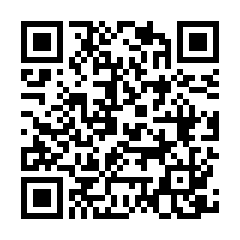
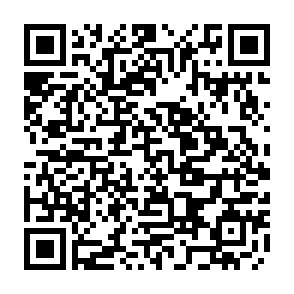

iPhone版は日本国内からのみダウンロードが可能です。
また、本アプリは限定公開のため、App Storeで検索しても表示されません。
ダウンロードの際は、上記のQRコードをご利用ください。
The iPhone version can only be downloaded within Japan.
This app is distributed as an unlisted app and will not appear in App Store search results.
Please use the QR code above to download the app.

利用情報
Maintenance Schedule
2026.11.04更新
障害 / System failure
RITSUMEIKAN STUDENT PORTAL
- Androidアプリをご利用の皆様へ
現在、AndroidアプリからRITSUMEIKAN STUDENT PORTALをご利用いただけない状況が発生しています。
現在、原因を調査しております。復旧までの間は、各種ブラウザから以下のURLにアクセスし、
RITSUMEIKAN STUDENT PORTALをご利用ください。
https://sp.ritsumei.ac.jp/studentportal
ご利用の皆様にはご不便、ご迷惑をおかけいたしますが、ご理解のほどよろしくお願いいたします。
- For Android App Users
RITSUMEIKAN STUDENT PORTAL is currently unavailable through the Android app.
We are currently investigating the cause of this issue.
Until service is restored, please access RITSUMEIKAN STUDENT PORTAL
using a web browser at the link below:
RITSUMEIKAN STUDENT PORTAL
We apologize for the inconvenience and appreciate your understanding.
2026.10.01更新
お知らせ / Information
CAMPUS WEB
-
Mac/Safari環境をご利用の場合の注意点
CAMPUS WEB画面右上の「☰(メニュー)」から印刷できない場合があります。
Mac/Safari環境で印刷する必要がある際は、ブラウザの印刷機能から印刷してください。 -
Important Information for Mac/Safari Users
In the Mac/Safari environment, printing from the "☰ (Menu)" in the upper-right corner of the CAMPUS WEB screen may not be available.
If you need to print, please use the browser's print function.
2026.02.10更新
メンテナンス / Maintenance
CAMPUS WEB
-
定期メンテナンスのため、以下の時間はCAMPUS WEBを利用することができません。
毎日AM 4:30 ~ AM 5:30(ただし受講登録期間中はAM 2:00 ~ AM 6:30) 毎週水曜日 PM 7:30 ~ 翌朝 AM 9:00(メンテナンスが実施されない場合もあります) -
CAMPUS WEB will not be available during the hours below due to maintenance.
From 4:30 AM to 5:30 AM every day (During course registration periods: from 2:00 AM to 6:30 AM)
From 7:30 PM on every Wednesday to 9: 00 AM of the following day (This maintenance may not be carried out in some cases).
〈注意〉ユーザーの皆さまへ /<Notice>To users
-
推奨環境について
こちらを確認して下さい。 -
大学の公式サービス以外の利用について
詳細は、大学の公式サービス以外の利用についてを確認して下さい。
セキュリティ保持のため、ログイン後に何も操作をしない時間が90分続くと、自動的にセッションタイムアウトします。
「履修状況確認(受講登録内容・成績一覧)」は、不定期でメンテナンスを行います。事前にスクリーンショットを撮る等してください。 -
Recommended System Requirements
Please click here for details. -
Please click here for details Regarding services other than the university’s official ones
To maintain security, a session timeout will occur automatically after 90 minutes.
The “Credit Earning State” (course registration and list of grades)” page will be maintained irregularly. Please take a screenshot etc. in advance.
- ※システムメンテナンスのため、必要に応じ、一時的に当システムの利用を休止とさせていただく場合があります。
- ※やむを得ず緊急的に休止する場合もありえますが、当画面を通じて事前に利用休止のお知らせをいたします。
- ※利用に関するお問い合わせは、各キャンパス学びステーション・朱雀独立研究科事務室までお寄せください。