

Applying for Certificates
Notes
Click here for details.
01- How to Receive Certificates
| Digital Certificate (PDF) | Issue at Convenience Store(Paper Certificate) | Receive by Post(Paper Certificate) | |
|---|---|---|---|
| Certificates Available |
Certificate of:Graduation/Completion/Attendance/Withdrawal/Enrollment (non-regular student),etc* *See details below. |
All Certificates | |
| Receipt Method | PDF(Displayed in the Parchment Portal) * Not available for viewing or download after 90 days from the date of issuance. |
Printed at multifunction printers at Seven-Eleven, Lawson, or FamilyMart stores in Japan. | Mailed by Ritsumeikan University |
| Time to Receipt | Email received within 15 minutes after payment | Email received within 10 minutes after payment | Mailed 2-7 business days after payment
|
| Notes on Certificate Originals | Electronically Signed PDF as the Original * Printouts are not valid originals. |
Valid as an original with a monochrome seal. *Valid even if “COPY/コピー禁止” appears faintly. |
Valid as an original with a monochrome seal |
| Certificate issuing fee | 500yen / copy ("学力に関する証明書" are 1,000 per copy.) | ||
| Service fee for certificate issuance service | 300yen / copy | ||
| Additional Fees | - | Print charge for multi-function printer: 20yen / sheet | Postage (Domestic: 430yen per shipment International: 1,450yen-3,900yen per shipment * Varies by destination country.) |
02- How to Apply for Certificates
Payments are nonrefundable if you cancel the issuance or you pay incorrect fees. Please make sure that the content of your application is correct.
*Apply for use (first time only) from here as well [Online Application Website] Manual for Applying for Use (Only for the First Time) [Online Application Website] Manual for Applying for Certificates
Process for Apply for Certificates
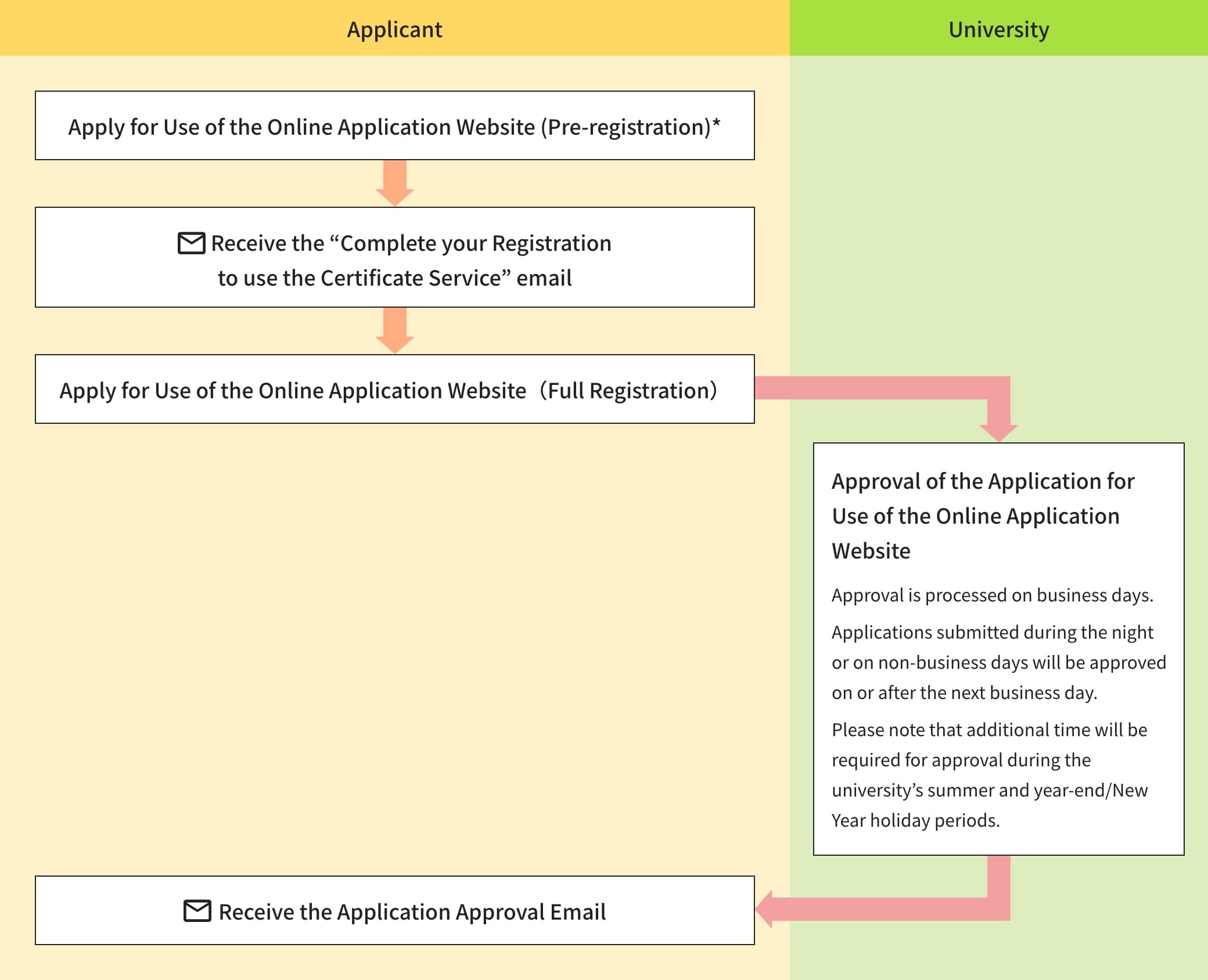
Step1Apply for Use of the Online Application Website (First Time Only)
Step2Apply for Certificates
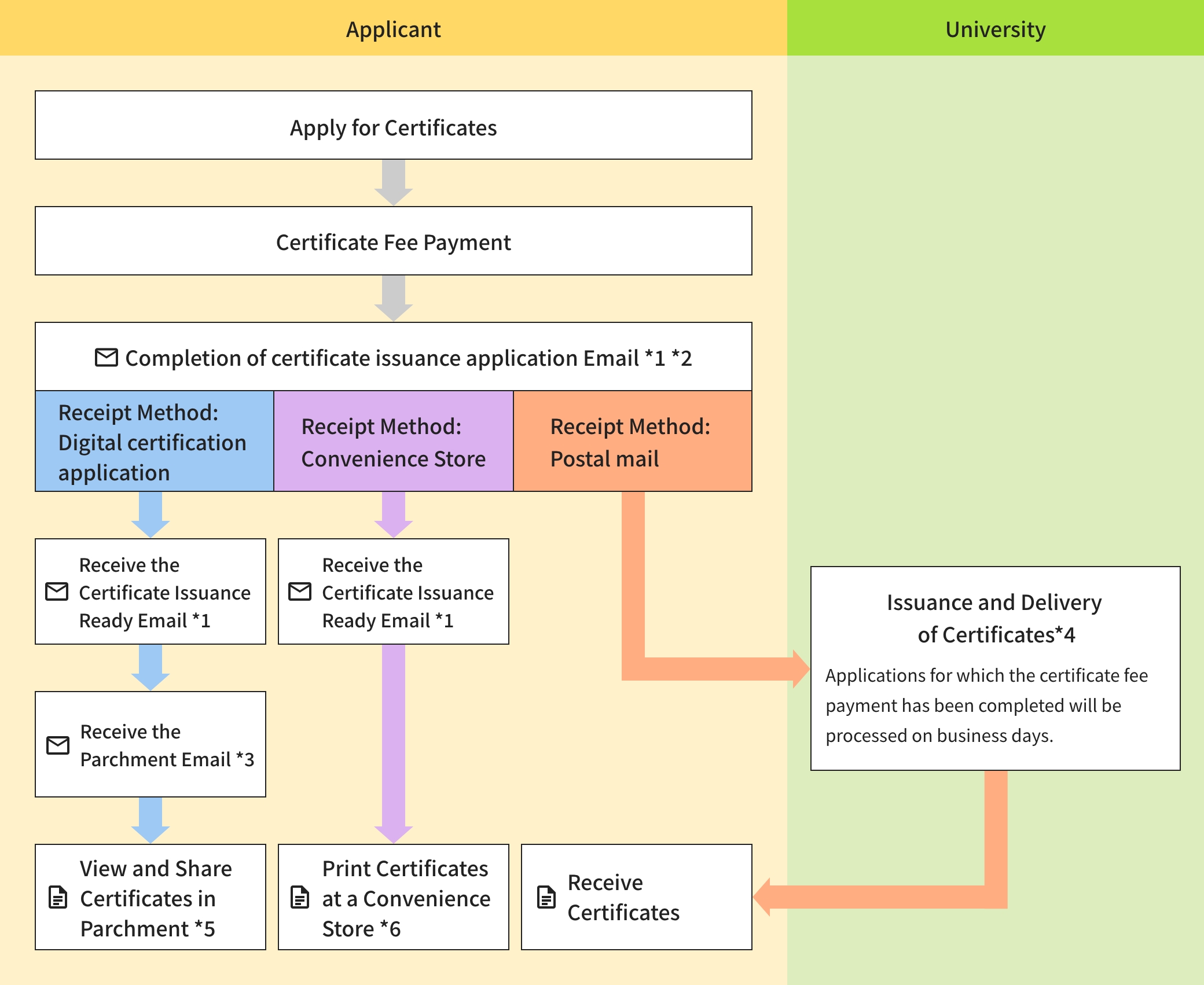
- *1The email is usually sent within a few minutes, but it may take longer in some cases.
- *2If you select Convenience Store Payment on the Payment Method screen, you will pay the certificate issuance fee after receiving the Certificate Issuance Application Completion Email.
- *3It usually takes about 5–15 minutes to receive an email from Parchment.
- *4For the estimated processing time until shipment, please refer to the “Types and Samples of Certificates, Estimated Issuance Periods, and Important Notes”.
- *5Please note that digital certificates in Parchment are available for viewing and sharing only within a limited period. After the expiration date, they can no longer be viewed or shared. Refunds cannot be provided after payment has been made, so please apply with care.
- *6Please note that certificates issued through Convenience Store Issuance are available for printing only within a limited period (as specified in the Certificate Issuance Ready Email). After the printing deadline has passed, they can no longer be printed at a convenience store. Refunds cannot be provided after payment has been made, so please take care not to miss the printing deadline.
How to Use Digital Certificates
Digital certificates are delivered through a separate portal called Parchment, rather than through the online application website. Users can use Parchment to view, download, and share their certificates with recipients.
After completing your application through the online application website, an automated email will be sent from Parchment. After completing the initial registration process and logging in to Parchment, you will be able to access and use your digital certificates.
If you intend to share digital certificates with a recipient, you must confirm in advance that the recipient accepts digital certificates.
For instructions on initial registration and how to use Parchment, please be sure to refer to the following manual.
Points to note
- If you are enrolled in multiple courses (e.g., undergraduate and graduate school), please select one of them and apply for use. You can apply for certificates for both student registries at once.
- Since February 2026, certificates issued at convenience stores have been accepted by the Ministry of Foreign Affairs and Japanese diplomatic missions overseas for overseas visa applications.
- If a sealed envelope is required for your certificates, please select “Receive by Post” as the Receipt method, regardless of whether convenience store issuance is available.
- If you wish to have your certificate sent overseas, please check the Japan Post website “Service availability by country” before submitting your application. Please note that payments cannot be refunded after the transaction is completed.
- When issued by post, some certificates may require about one week before they are shipped. Please note that additional time may be required during the university’s summer and year-end/New Year holiday periods, so please apply well in advance.
- The university assumes no responsibility for the non-receipt, loss, damage, or staining of certificates due to postal accidents or other postal issues.
- When issuing certificates at a convenience store, you are considered to have agreed to the Terms of Use for the Netprint and Network Print Services provided at the link below.
Terms of Use for netprint (Seven-Eleven) (Japanese Only)
Terms of Use for the Network Print Service (FamilyMart / Lawson) (Japanese Only)
03- Types and Samples of Certificates, Estimated Issuance Periods, and Important Notes
- *The samples shown are for reference only, and the format of the actual certificates you receive may differ.
- *The estimated processing time is provided as a guideline only. Please note that issuance may take longer in some cases, so be sure to apply well in advance.
| Certificate | Language of Issuance *Click "Jpn" or "Eng" to view a sample. |
Application via Online Application Website Availability (○×) / Estimated Processing Time | Note | |
|---|---|---|---|---|
| Digital certification application・Print at Convenience Store | Mail Delivery (Shipping Date) |
|||
| 成績証明書 / Academic Transcript | Jpn/Eng | ○ (Immediately after payment*1) | ○ (On the next business day after the application is confirmed) | Your GPA is not listed on the Academic Transcript.If you require proof of your GPA, please refer to the FAQ and apply for a “GPA Certificate.” |
| 卒業証明書 / Certificate of Graduation | Jpn/Eng | ○ (Immediately after payment*1) | ○ (On the next business day after the application is confirmed) | |
| 修了証明書 / Certificate of Completion | Jpn/Eng | ○ (Immediately after payment*1) | ○ (On the next business day after the application is confirmed) | |
| 在学期間証明書 / Certificate of Attendance | Jpn/Eng | ○ (Immediately after payment*1) | ○ (On the next business day after the application is confirmed) |
|
| 退学証明書 / Certificate of Withdrawal | Jpn/Eng | ○ (Immediately after payment*1) | ○ (On the next business day after the application is confirmed) |
|
| 学芸員資格授与証明書 | Jpn | × | ○ (3–6 business days after the application is confirmed) | |
| 学校図書館司書教諭関係科目単位修得証明書 | Jpn | × | ○ (3–6 business days after the application is confirmed) | |
| 図書館司書関係科目 単位修得証明書 |
Jpn | × | ○ (3–6 business days after the application is confirmed) | |
| 図書館司書資格授与証明書 | Jpn | × | ○ (3–6 business days after the application is confirmed) | |
| 博物館学芸員課程単位修得証明書 | Jpn | × | ○ (3–6 business days after the application is confirmed) | |
| 学力に関する証明書 | Jpn | × | ○ (7–10 business days after the application is confirmed) |
|
| 健康診断証明書 / Certificate of Health | Jpn/Eng | × | ○ (3–6 business days after the application is confirmed) |
|
| 学位授与証明書 / Certificate of Degree (Graduate School) |
Jpn/Eng | × | ○ (3–6 business days after the application is confirmed) |
|
| 単位修得証明書/Certificate of Completion of Doctoral Degree | Jpn/Eng | × | ○ (On the next business day after the application is confirmed) |
|
| (非正規生)在籍証明書 / (non-regular student)Certificate of Enrollment | Jpn/Eng | ○ (Immediately after payment *1) | ○ (On the next business day after the application is confirmed) |
|
- *1Issuance is possible after you receive the Certificate Issuance Preparation Completion Email.
For Digital Certification Application, digital certificates can be accessed by logging in to Parchment after receiving an automated email from Parchment.
Other Certificates
Other certificates include GPA certificates and certificates issued in formats specified by the organization to which you are submitting them.
Before submitting your application, please review the FAQ and contact the Manabi Station on the campus where your former College or Graduate School is currently located in advance for consultation.
04- When a Syllabus Is Required
If you need a syllabus, please download syllabi for AY 2015 and later from the link below.
Ritsumeikan University Online Syllabus- *If you need copies of syllabi from AY 2014 or earlier, please contact the Manabi Station on the campus where your former College or Graduate School is currently located.
05- Education Verification Requests
Please see the PDF at the link below for details regarding Education Verification Requests.
Education Verification Requests06- FAQ
About Online Application Website
I cannot log in.
- You can log in only after you receive the Application Approval Email following your application for use. Applications for use to the online application website are reviewed and approved by staff in the order they are received. If you have not yet received the email, please wait a little longer.
- Are you trying to log in from "Current Students Login"? Please log in from "Graduates Login".
I forgot my login ID./What should I do if I have deleted the email address registered as my login ID?
- Your login ID is the email address you registered when applying for use.
- Even if you delete the email address from your webmail service or email account, you can continue to use it as your login ID for the online application website. However, you will no longer be able to receive emails such as application completion notifications or password reset emails. Therefore, please log in using your registered login ID and update your email address through the “Change e-mail Address” menu.
If you registered using your RAINBOW email address (an email address provided to enrolled Ritsumeikan University students), please note that the RAINBOW email address will become unavailable after a certain period following graduation. In that case, please follow the same procedure to change your registered email address. - If you have forgotten your login ID, please submit a new application for access to the online application website. When submitting your application, be sure to indicate in the Remarks field that you have forgotten your login ID and/or password. If no such information is provided, your application may be declined.
I forgot my login password.
Your password was set at the time of your application for use. It must be 8–24 characters long and include a combination of uppercase letters, lowercase letters, and numbers. If you cannot recall your password, please reset it by selecting “Forgot your password?” on the login screen.
Can I use my RAINBOW email address (@●●.ritsumei.ac.jp) from my time at Ritsumeikan University as my login ID?
No. Please do not use your RAINBOW email address (@●●.ritsumei.ac.jp) as your login ID, as it will become unavailable after a certain period following graduation.
What payment methods are available?
Convenience store payment (available at convenience stores in Japan: Seven-Eleven, FamilyMart, and Lawson), credit card payment, and carrier billing are available.
About Online Application Website・Certificate Issuance
The certificate I want to issue does not appear on the certificate selection screen.
Please contact the Manabi Station on the campus where your former College or Graduate School is currently located.
[The campus where your College or Graduate School is located]
https://en.ritsumei.ac.jp/academics/
I selected convenience store issuance and paid the certificate fee, but I have not received the “Certificate Ready for Printing” email
From the menu screen, select “Certificate Application History.”
Then, choose the relevant application from the list. The “Print Reservation Number” and “User Number” will be displayed.
About Certificate Issuance
Can digital certificates be issued?
Yes. Digital certificates have been available since October 15, 2026.For information on how to obtain digital certificates, please refer to [here].
Can I apply for certificate issuance at the Manabi Station (certificate issuing counter)?
Yes. If you wish to apply for certificate issuance at the Manabi Station (certificate issuing counter), please bring one form of identification (Driver's license, Eligibility Confirmation form, Passport, or Another photo ID) and visit the Manabi Station on the campus where your former College or Graduate School is currently located.
Please note that, depending on the type of certificate, issuance may not be possible at campuses other than the one where your former College or Graduate School is currently located, and some certificates cannot be issued and provided on the same day. We recommend contacting the Manabi Station in advance to confirm.
If a certificate cannot be issued and provided on the same day, it will be provided by postal delivery or counter pickup on a later date. If you wish to receive your certificate by postal delivery, you are responsible for the postage fee. Please bring one Letter Pack Light envelope with you. (Letter Pack Light envelopes cannot be purchased at the counter.)
*Before visiting, please check the university website for any temporary counter closures.(Counter hours: Weekdays 9:00–17:00) *At Suzaku Campus (Suzaku Administrative Office), only certificates related to the Graduate Schools of Law, Public Policy, and Teacher Education are available. *Tokyo Campus and Osaka Umeda Campus do not provide certificate issuance services at the counter.
Can a representative apply for certificates on my behalf?
In principle, please apply for certificates in person. However, if you have unavoidable circumstances, a representative may apply on your behalf.
If a representative applies on your behalf, the following documents are required in addition to your own identification document:
(1) Letter of Commission
(2) Identification document of the representative
You can download the Letter of Commission form here.
Applications are accepted either by post or at the Manabi Station (certificate issuing counter) on each campus. If you have any questions, please contact the Manabi Station on the campus where your former College or Graduate School is located in advance.
I need to submit certificates to the Ministry of Foreign Affairs or an overseas diplomatic mission for visa application purposes. Can the certificates be printed on their designated forms?
Previously, the Ministry of Foreign Affairs did not accept certificates issued at convenience stores. However, since February 2026, certificates issued at convenience stores have become acceptable.
Therefore, certificates issued at convenience stores may be submitted directly to the Ministry of Foreign Affair.Issuance on designated forms is not required.
About Contents of the Certificate
The official seal printed on the paper certificate I received is in black and white. Is it still considered an original?
Yes. Although the paper certificate, including the official seal, is printed in black and white, it is issued with special security processing that prevents duplication and is regarded as an “original” document.
When photocopied, words such as “COPY” or “コピー禁止” may appear. These security marks may also be faintly visible when viewed against the light, but this does not affect its validity as an original certificate.
Is GPA shown on the Academic Transcript?
Your GPA isn’t on the Academic Transcript.
If you require proof of your GPA, we will issue a GPA Certificate (Japanese / English).
When applying for a certificate via the Online Application Website, please:
Select “Postal mail” as the Receipt Method.
Select “Other” on the certificate selection screen.
Enter “Request for GPA Certificate (Japanese, x copies/ English, x copies)” in the Notes field.
*Please note that convenience store issuance and digital certificates are not available
*After confirming your application, the certificate will be mailed within approximately 3–6 business days.
About Digital Certificates and Using Parchment
Do digital certificates have an expiration date?
Digital certificates can be viewed, downloaded, and shared through Parchment for 90 days from the date of issuance.
Digital certificates downloaded from Parchment do not expire.
Can I use and submit a digital certificate downloaded from Parchment multiple times?
Yes. You can use and submit the same PDF file downloaded from Parchment multiple times. The digital signature remains valid, so you can submit (share) the file to multiple recipients by copying it, attaching it to an email, uploading it, or other similar methods.
I would like to share a digital certificate with a recipient. What is the difference between (1) sharing it through Parchment (by selecting “Email” as the sharing method) and (2) downloading the digital certificate from Parchment and sending it from my own email address?
The digital certificate shared is the same in both methods, but the way it is shared is different.
For instructions on method (1), please refer to the Digital Certificate User Manual. With method (1), an email notifying the recipient that a certificate has been shared is automatically sent from xxx@digitary.net. When the recipient clicks the link in the notification email, they will be directed to Parchment. They can then view the certificate by entering their email address and the access PIN (if one has been set).
With method (2), you download the digital certificate (PDF file) from Parchment and send it to the recipient from your own email address.
I would like to download a digital certificate from Parchment, but I cannot find the download button.
On the“Documents” page in Parchment, check the certificate you wish to download. Is the status in the upper-right corner shown as“New” or“Available”? If the status is“Expired,” the certificate cannot be downloaded. Also, check whether“1 share credit remaining” is displayed in the lower-right corner.
You can download the certificate only if the status is “New,” or if the status is “Available” and a share credit is displayed.
If so, click the certificate name to open the details page and download the certificate.
Once you share the digital certificate through Parchment, the number of remaining share credits becomes 0, and the certificate can no longer be downloaded.
07- Contact Information
Before making an inquiry, please check the Frequently Asked Questions at the link below. If your issue is not resolved, please contact us using the information provided below.
For the systems (Digital Certification Application, Parchment, and the Issuance Service at Convenience Store), payment, and multifunction printer
| Contact |
Help Desk *Only available in Japanese
|
|---|---|
| Opening Hours | 9:00~23:00 |
For the request for use
| Contact | Kinugasa Manabi Station TEL:075-465-7877 E-mail:kic-certst.ritsumei.ac.jp |
|---|---|
| Opening Hours | Mon-Fri 9:00~17:00 |
Other inquiries related to certificates
| Contact | Please contact the Manabi Station on the campus where your former College or Graduate School is currently located.
Kinugasa, Suzaku
BKC
OIC |
|---|---|
| Opening Hours | Mon-Fri 9:00~17:00 |